
 Slimemike's GUI RedrawTexture packs · 26.x
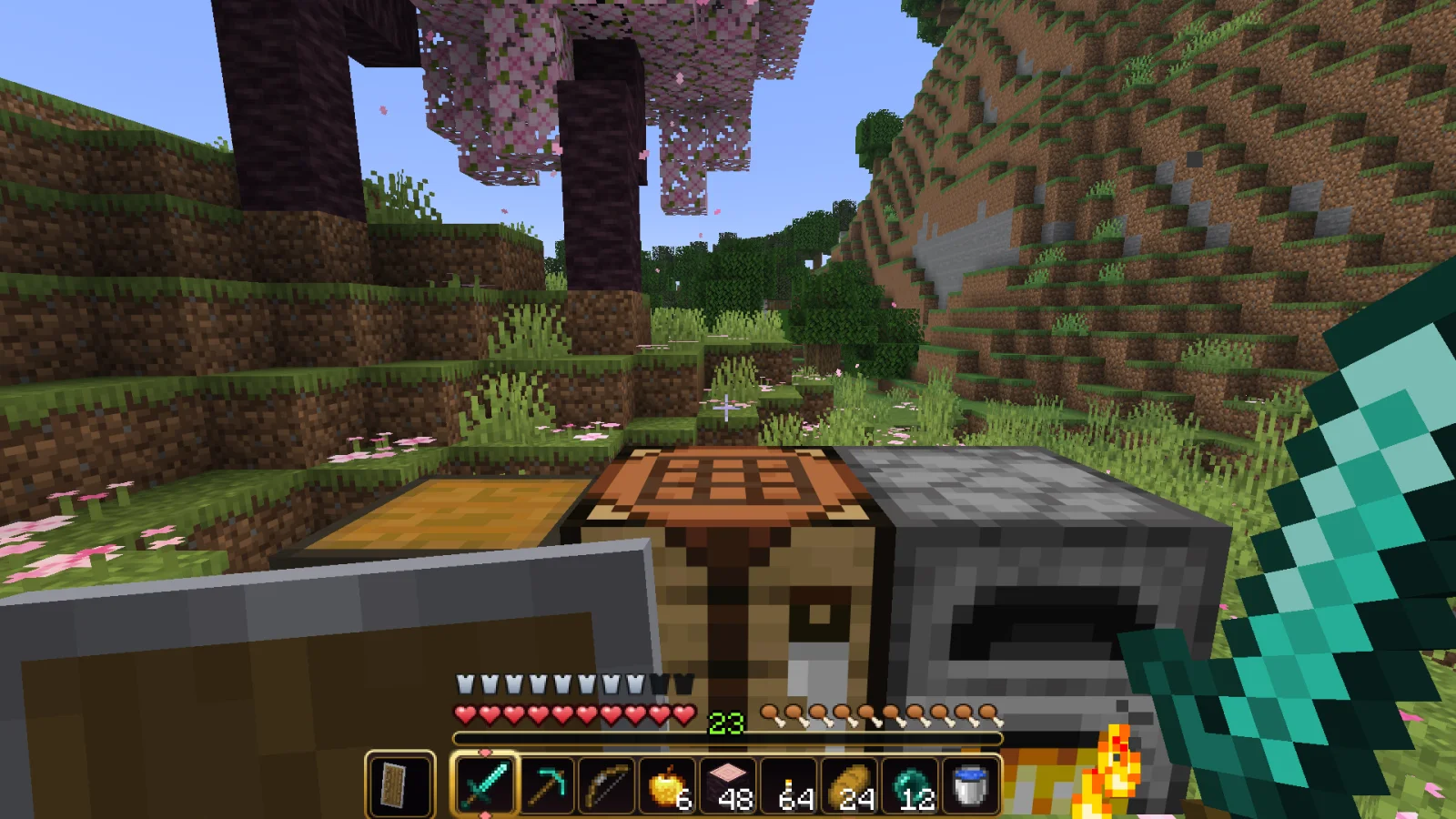
This Texture pack redesigns Minecraft’s HUD, including hearts, hunger, armour, XP bar, and hotbar in a style that I work with
Free76 downloads
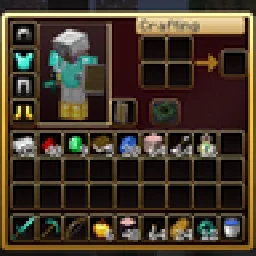
Dark crimson and gold redesign of the vanilla menus and HUD: inventory, crafting table, furnaces, chests, villagers, hotbar, hearts, buttons and more – in HD.
Direct download from Modrinth · 1 downloads
RBZ GUI is a texture pack made by RedBlockZ. Dark crimson and gold redesign of the vanilla menus and HUD: inventory, crafting table, furnaces, chests, villagers, hotbar, hearts, buttons and more – in HD.
It supports Minecraft 26.x. It has been downloaded 1 times on Modrinth. The last update came out on Nov 8, 2026.
The newest is 1.0.0, released on Nov 7, 2026. It is made for Minecraft 26.2, 26.3. It runs on Minecraft. The download is 1.6 MB.
| Version | Released | Minecraft | Type |
|---|---|---|---|
1.0.0 | Nov 7, 2026 | 26.2, 26.3 | Beta |
RBZ GUI gives the vanilla menus and HUD a new look: dark crimson backgrounds, golden frames and rounded slots – in double resolution (HD). The layout stays exactly like vanilla, so every slot is where you expect it.
A pure resource pack – no mods needed. Works in singleplayer and on any server.
Containers
HUD
Everything else
RBZ GUI gibt den Vanilla-Menüs und der Anzeige einen neuen Look: dunkelrote Hintergründe, goldene Rahmen und abgerundete Slots, in doppelter Auflösung (HD). Der Aufbau bleibt genau wie in Vanilla, jeder Slot ist da, wo du ihn erwartest.
Ein reines Resource-Pack, keine Mods nötig. Läuft im Einzelspieler und auf jedem Server.
Behälter: Inventar, Kreativ-Reiter, Werkbank, Crafter, Ofen, Schmelzofen, Räucherofen, Braustand, Kisten und Fässer, Shulkerkiste, Werfer und Spender, Trichter, Amboss, Schmiedetisch, Schleifstein, Steinsäge, Webstuhl, Kartentisch, Zaubertisch, Leuchtfeuer, Dorfbewohner-Handel, Pferde- und Nautilus-Inventar, Spielmodus-Wechsler.
Anzeige: Hotbar mit Auswahlrahmen und Zweithand, Erfahrungsleiste, Herzen, Hunger und Rüstung, Bossleiste.
Außerdem: Knöpfe, Schieberegler, Kästchen, Reiter, Bildlaufleisten, Tooltips, Rezeptbuch, Fortschritte-Fenster, Menü-Hintergründe.
Kompatibilität: Minecraft 26.2 und 26.3 (eine Datei für beide). Läuft zusammen mit anderen Resource-Packs. Leg RBZ GUI über Packs, die ebenfalls die Menüs ändern.
Written by RedBlockZ. Read it with pictures on Modrinth.
Download the .zip file from Modrinth. Do not unzip it.
In Minecraft, open Options, then Resource Packs, then Open Pack Folder.
Drop the .zip file into that folder and go back to the game.
Move RBZ GUI to the right-hand list and click Done.
It is made for Minecraft 26.x. On other versions Minecraft marks it as incompatible, but it often still works.
Full guide: How to install Minecraft resource packs
| Resource | Downloads | Versions | Last update | Price |
|---|---|---|---|---|
| RBZ GUIthe one you looked at | 1 | 26.x | 8 days ago | Free |
| Slimemike's GUI RedrawSIimemike | 76 | 26.x | Oct 9, 2026 | Free |
 Better GUI for Sophisticated BackpacksMoongosu | 367K | 1.16 – 1.21 | Jan 4, 2025 | Free |
 AlacritySatellence | 1.8M | 1.16 – 26.x | Sep 16, 2026 | Free |
Yes. RBZ GUI supports Minecraft 26.x. All supported versions: 26.x.
Yes. RBZ GUI is free to download from Modrinth.
Yes. The last update came out in the past day.
The closest ones are Slimemike's GUI Redraw, Better GUI for Sophisticated Backpacks and Alacrity. Compare all alternatives
Slimemike's GUI RedrawTexture packs · 26.xThis Texture pack redesigns Minecraft’s HUD, including hearts, hunger, armour, XP bar, and hotbar in a style that I work with
Better GUI for Sophisticated BackpacksTexture packs · 1.16 – 1.21A complete redesign of the Sophisticated Backpacks interface, buttons, slots, indicators and much more!
AlacrityTexture packs · 1.16 – 26.x32x resource pack with crazy attention to details
 Mandala's GUITexture packs · 1.12 – 1.21
Mandala GUI is an elegant theme, in the style of Mandala Creations. It is specifically made for people who like Dark mode. It only changes the UI of…
 ArdaCraft Resource PackTexture packs · 1.19 – 1.20
The resource pack overlay for the ArdaCraft server. Download the ArdaCraft modpack to join the server. Do not download this unless you know what you're doing.
 SenpaiSpider 1 Million Texture PackTexture packs · 1.16 – 1.21
Here is my 1M Texture Pack. While it may not be the most optimized, I hope my subscribers will enjoy it. Thank you for supporti
Log in to leave a review.