
 Spotify HudMods · 1.21
Spotify HUD shows the song you're playing in Spotify (Windows desktop app) as a small card on your Minecraft screen. The card has the title, artist, cover art…
Free90 downloads

Play Spotify tracks on jukeboxes. Server-authoritative with a vanilla fallback, safe for unmodded clients, singleplayer compatible.
Direct download from Modrinth · 13 downloads
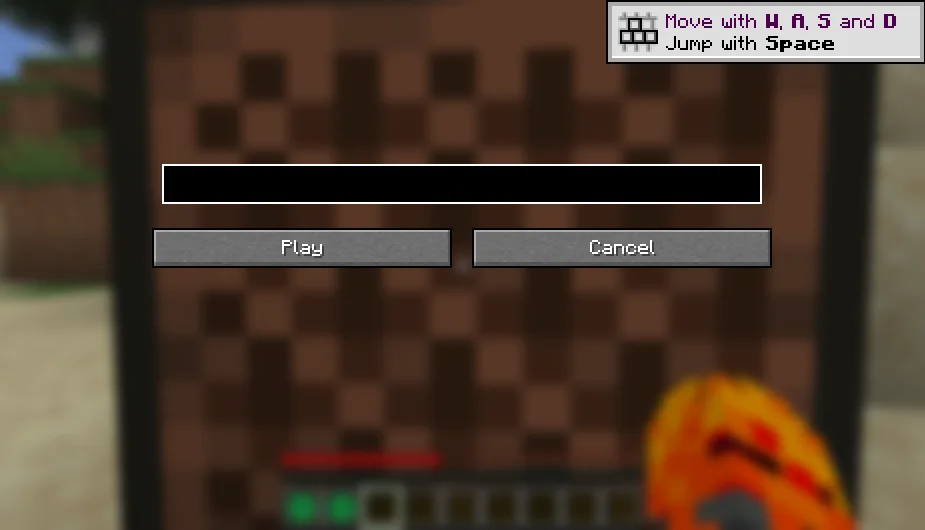
Minefy is a mod made by TOP_G2026. Play Spotify tracks on jukeboxes. Server-authoritative with a vanilla fallback, safe for unmodded clients, singleplayer compatible.
It supports Minecraft 1.21 – 26.x. It has been downloaded 13 times on Modrinth. The last update came out on Oct 15, 2026.
Minefy has had 4 releases on Modrinth since Oct 15, 2026. 4 of them came out in the past year. The newest is 1.0.0+26.3, released on Oct 15, 2026. It is made for Minecraft 26.3. It runs on Fabric. The download is 76 KB.
| Version | Released | Minecraft | Type |
|---|---|---|---|
1.0.0+26.3 | Oct 15, 2026 | 26.3 | Release |
1.0.0+26.2 | Oct 15, 2026 | 26.2 | Release |
1.0.0+26.1 | Oct 15, 2026 | 26.1, 26.1.1, 26.1.2 | Release |
1.0.0+1.21 | Oct 15, 2026 | 1.21 – 1.21.11 | Release |
Play Spotify tracks on Minecraft jukeboxes. Minefy is a server-authoritative Fabric mod: the server owns all track state, validates every submission, and decides what each player hears. Players with the mod get a URL input screen, synced playback state, positional audio hooks, and album-art disc overlays. Players without the mod hear a deterministic vanilla music-disc fallback sound, so unmodded clients can connect and play without crashes or kicks. The mod works in singleplayer (via the integrated server) and on dedicated servers.
Minefy file · Minecraft · Loader · Java
minefy-1.0.0+1.21.jar · 1.21 - 1.21.11 · Fabric · 21+
minefy-1.0.0+26.1.jar · 26.1 - 26.1.2 · Fabric · 25+
minefy-1.0.0+26.2.jar · 26.2 · Fabric · 25+
minefy-1.0.0+26.3.jar · 26.3 · Fabric · 25+
Spotify metadata works out of the box for single tracks through a no-key lookup. For full album track lists and the richest metadata, optionally add Spotify API credentials to the config (see spotifyClientId below): create a free app in the Spotify developer dashboard and put its client id and secret in minefy-server.json (the secret can also come from the SPOTIFY_CLIENT_SECRET environment variable). Without credentials, single tracks still resolve with real names, and album links explain what is missing.
Note on Spotify audio: track metadata, syncing, fallback sounds, and album-art fetching are fully implemented. Actual Spotify stream decoding is an integration point (it requires Spotify API credentials and a streaming SDK): modded clients play positional audio through the provided handler hook, and everyone hears the vanilla fallback until a streaming backend is connected.
Server config file: config/minefy-server.json (created with defaults on first run).
Key · Default · Description
requireBlankDiscInInventory · false · When true, /minefy create consumes one vanilla music disc from your inventory. When false (default), the Minefy Disc is granted directly.
fallbackVolume · 1.0 · Volume of the vanilla-disc fallback sound heard by unmodded clients.
maxTrackUrlLength · 512 · Maximum accepted length for a submitted Spotify URL or track ID.
enableSpotifyStreaming · true · Master switch for modded-client Spotify audio streaming.
maxDistance · 24.0 - 64.0 · Audible radius in blocks for client-side distance attenuation (exact default depends on the Minecraft version).
enableFallbackForUnmodded / fallbackForUnmodded · true · When false, no vanilla fallback sound is played for unmodded clients.
enrichViaOEmbed · true · Enrich track titles and artists through the public Spotify oEmbed endpoint (no API key needed).
defaultVolume · 0.8 · Base volume for Spotify audio on modded clients.
spotifyClientId · (empty) · Optional Spotify application client ID. Enables full track and album lookups through the Spotify Web API.
spotifyClientSecret · (empty) · Optional Spotify application client secret (may also come from the SPOTIFY_CLIENT_SECRET environment variable). Required together with the client ID for album links. Never share this value.
Not every key exists in every Minecraft version build; missing keys simply use the documented defaults above.
All commands are usable by every player (permission level 0).
Command · Description
/minefy create · Creates Minefy Discs bound to real song names. A track link gives one disc; an album link gives one disc per song (and consumes one vanilla music disc per song when requireBlankDiscInInventory is true, telling you the exact count if you are short). If your inventory is full, discs are dropped at your feet.
/minefy play · Immediately starts playback on the jukebox you are looking at (within 8 blocks) using the real song name. An album link plays its first track and names the album.
/minefy stop · Stops playback on the jukebox you are looking at (available in the 26.1 and 26.3 builds).
Accepted track formats: open.spotify.com/track/ and .../album/ links (query parameters are ignored), spotify:track:... and spotify:album:... URIs, and raw track IDs.
Written by TOP_G2026. Read it with pictures on Modrinth.
This mod is needed on both the server and every player who joins.
Install Fabric for Minecraft 1.21 – 26.x.
Add the mods it needs: Fabric API.
Download the .jar file from Modrinth and put it in the mods folder of your .minecraft directory.
Start Minecraft with the Fabric profile.
Easier: in Prism Launcher or the Modrinth App, search for Minefy in your instance's mods and click Install. It adds the loader and the mods it needs for you.
Full guide: How to install Minecraft mods
| Resource | Downloads | Versions | Last update | Price |
|---|---|---|---|---|
| Minefythe one you looked at | 13 | 1.21 – 26.x | Oct 15, 2026 | Free |
| Spotify HudDragonMCPVP | 90 | 1.21 | 25 days ago | Free |
 Spotify ControlEmil_Deu | 8 | 1.21 | 9 days ago | Free |
 Just HammersErrorMikey | 3.3M | 1.18 – 26.x | Sep 27, 2026 | Free |
Yes. Minefy supports Minecraft 26.x. All supported versions: 26.x, 1.21.
Yes. Minefy is free to download from Modrinth.
Both. The server and every player need Minefy installed.
Yes: Fabric API. Install it before Minefy.
Yes. The last update came out in the past day.
The closest ones are Spotify Hud, Spotify Control and Just Hammers. Compare all alternatives
Spotify HudMods · 1.21Spotify HUD shows the song you're playing in Spotify (Windows desktop app) as a small card on your Minecraft screen. The card has the title, artist, cover art…
Spotify ControlMods · 1.21Spotify overlay for Minecraft: search, browse and manage your library, control playback, and host listening parties where the whole server hears the same…
Just HammersMods · 1.18 – 26.xAdds hammers to the game that are able to mine in a 3x3, 3x3x3, 5x5x1, 5x5x3 and finally a 5x5x5! They're pretty awesome.
 World Play TimeMods · 1.19 – 26.x
Displays the world's play time in the world selection menu.
 Silk Touch SpawnerMods · 1.20 – 26.x
Silk Touch Spawner lets you mine mob spawners with a Silk Touch pickaxe, pick them up as items, and place them back while keeping the same mob type.
 Jukebox PlaylistsMods · 1.21
Place a chest above a jukebox to use its music discs as a playlist. A backport of the Jukebox Playlists feature from Minecraft 26.4 Snapshot 4.
Log in to leave a review.