
 Phoxel PTShaders · 1.20 – 26.x
[WIP] A Minecraft shader that strives to capture some of the beauty of real life, mixed with the unique ambience and blocky beauty of the Minecraft we've all…
Free184,218 downloads
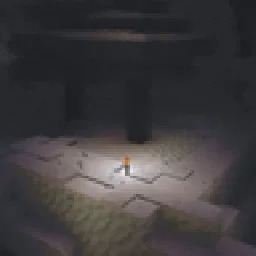
Attempts to faithfully recreate how your actual, real-life eyes see in the dark rather than just turning down the brightness.
Direct download from Modrinth · 11,359 downloads


Realistic Dark is a shader pack made by dairycultist. Attempts to faithfully recreate how your actual, real-life eyes see in the dark rather than just turning down the brightness.
It supports Minecraft 1.16 – 26.x. It has been downloaded 11,359 times on Modrinth. The last update came out on Jun 25, 2026.
The newest is 1.0, released on Jun 25, 2026. It is made for Minecraft 1.16.5 – 26.2. It runs on Iris. The download is 2 KB.
| Version | Released | Minecraft | Type |
|---|---|---|---|
1.0 | Jun 25, 2026 | 1.16.5 – 26.2 | Release |
Attempts to faithfully recreate how your actual, real-life eyes see in the dark rather than just turning down the brightness
In the dark, saturation (colorfulness) is completely lost, what you see becomes blurrier and noisier (configurable in the shader settings), and the darkest color defaults not to true black, but to eigengrau (also configurable). I'm not too experienced with writing specifically Iris/Oculus shaders, so the light areas are also different from vanilla in this shader, but I think it nevertheless looks good :)
I've only tested this shader on 1.19.2 (same version as the DREAD horror modpack; not a coincidence), but it should probably work on other versions of Minecraft that Iris/Oculus support.
Inspiration from this video.
Remember to install either Iris (if you're on Fabric) or Oculus (if you're on Forge). This shader will not work without one of those.
Written by dairycultist. Read it with pictures on Modrinth.
Install Iris (with Sodium) or OptiFine for your Minecraft version: shaders need one of them.
Download the .zip file from Modrinth. Do not unzip it.
In Minecraft, open Options, then Video Settings, then Shader Packs, and click Open Shader Pack Folder.
Drop the .zip file into that folder, pick Realistic Dark in the list and click Done.
Shaders are heavy on the graphics card. If the game gets slow, pick a lower profile in the shader settings.
Full guide: How to install Minecraft shaders
| Resource | Downloads | Versions | Last update | Price |
|---|---|---|---|---|
| Realistic Darkthe one you looked at | 11K | 1.16 – 26.x | Jun 25, 2026 | Free |
| Phoxel PTDespatra | 184K | 1.20 – 26.x | May 11, 2026 | Free |
 Emissive Office CapeBluebird | 16K | 1.20 – 26.x | Sep 15, 2026 | Free |
 Retro Pixel ShaderRitz_Creator | 3,352 | 1.20 – 1.21 | Mar 21, 2026 | Free |
Yes. Realistic Dark supports Minecraft 26.x. All supported versions: 26.x, 1.21, 1.20, 1.19, 1.18, 1.17, 1.16.
Yes. Realistic Dark is free to download from Modrinth.
Yes: Iris Shaders, Oculus. Install it before Realistic Dark.
Yes. The last update came out in the past day.
The closest ones are Phoxel PT, Emissive Office Cape and Retro Pixel Shader. Compare all alternatives
Phoxel PTShaders · 1.20 – 26.x[WIP] A Minecraft shader that strives to capture some of the beauty of real life, mixed with the unique ambience and blocky beauty of the Minecraft we've all…
Emissive Office CapeShaders · 1.20 – 26.xThis will make the Mojang Office Cape glowing eyeblossom eyes glow like how they do in game
Retro Pixel ShaderShaders · 1.20 – 1.21This shader transforms Minecraft into a REAL 8-bit NES game – see the insane before/after!
Breathe new life into Minecraft with realistic water, dynamic fog, and advanced cinematic effects.
Log in to leave a review.