
 Ben's BundlesResource packs · 1.20 – 26.x
3D Bundle item in hand while keeping the vanilla 2D sprite in the GUI
Free958,622 downloads

Gives the popular minimap and worldmap mod by xaero a more consistent design with vanilla.
Direct download from Modrinth · 232,189 downloads
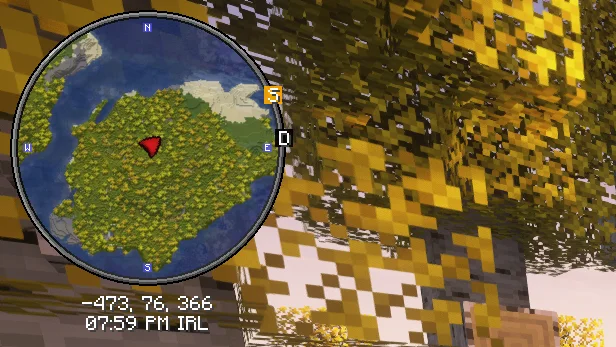
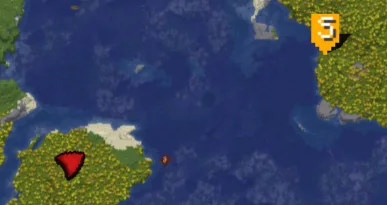
Xaero's Vanilla GUI is a resource pack made by DviousDingle. Gives the popular minimap and worldmap mod by xaero a more consistent design with vanilla.
It supports Minecraft 1.8 – 1.21. It has been downloaded 232,189 times on Modrinth. The last update came out on Nov 4, 2025.
Xaero's Vanilla GUI has had 3 releases on Modrinth since Oct 16, 2024. None of them came out in the past year. The newest is 1.1.0, released on Nov 4, 2025. It is made for Minecraft 1.10 – 1.20.3. It runs on Minecraft. The download is 18 KB.
| Version | Released | Minecraft | Type |
|---|---|---|---|
1.1.0 | Nov 4, 2025 | 1.10 – 1.20.3 | Release |
1.0.1 | Oct 18, 2024 | 1.10 – 1.20.3 | Release |
1.0.0 | Oct 16, 2024 | 1.7.10 – 1.21.1 | Release |
This resource pack customizes Xaero's Minimap to seamlessly blend with Minecraft’s vanilla aesthetic. Enjoy a minimalistic design with colors and icons that match the base game, bringing a consistent and immersive feel to your adventures. Ideal for players who want the functionality of Xaero's Minimap without straying from the classic Minecraft look.
Further more with this resourcepack, I suggest Xaero's Map Frame highly to go along with the aesthetic!
Written by DviousDingle. Read it with pictures on Modrinth.
Download the .zip file from Modrinth. Do not unzip it.
In Minecraft, open Options, then Resource Packs, then Open Pack Folder.
Drop the .zip file into that folder and go back to the game.
Move Xaero's Vanilla GUI to the right-hand list and click Done.
It is made for Minecraft 1.8 – 1.21. On other versions Minecraft marks it as incompatible, but it often still works.
Full guide: How to install Minecraft resource packs
| Resource | Downloads | Versions | Last update | Price |
|---|---|---|---|---|
| Xaero's Vanilla GUIthe one you looked at | 232K | 1.8 – 1.21 | Nov 4, 2025 | Free |
| Ben's BundlesBennyMcCarthy_ | 959K | 1.20 – 26.x | Jan 9, 2026 | Free |
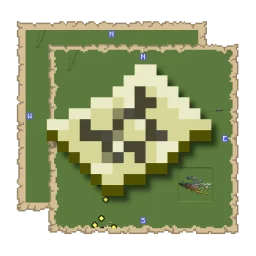 Xaero's Map FramePoeticRainbow | 376K | 1.18 – 26.x | Jul 20, 2024 | Free |
 Isle of Berk Xaero's Minimap IconsKesselot | 309K | 1.18 | 6 days ago | Free |
Not yet. The newest version it supports is Minecraft 1.21.
Yes. Xaero's Vanilla GUI is free to download from Modrinth.
Yes: Xaero's Minimap. Install it before Xaero's Vanilla GUI.
Yes. The last update came out in the past day.
The closest ones are Ben's Bundles, Xaero's Map Frame and Isle of Berk Xaero's Minimap Icons. Compare all alternatives
Ben's BundlesResource packs · 1.20 – 26.x3D Bundle item in hand while keeping the vanilla 2D sprite in the GUI
Xaero's Map FrameResource packs · 1.18 – 26.xReplaces the Xaero's Map frame with a map texture! Makes it feel *slightly* more Vanilla!
Isle of Berk Xaero's Minimap IconsResource packs · 1.18Adds minimap icons for the Isle of Berk Dragons & Eggs with support for various Addons.
 FA ExtensionsResource packs · 1.19 – 1.21
This is a temporary patch pack to fix vanilla chest models in the GUI slot when using Fresh Animation Extensions in newer versions of Minecraft
 Gui's HUD & UI EditionResource packs · 1.20 – 26.x
A better view to the GUI inspired on the Vanilla Minecraft!
 Shaded FontResource packs · 1.8 – 26.x
Add a shading effect to the vanilla Minecraft font. Popular amongst Hypixel Skyblock players!
Log in to leave a review.