
 Pyvtron VXShaders · 1.16 – 1.21
Pyvtron VX is a shader that adds realism into your world!
Free121,593 downloads
Adds options to make the world bend
Direct download from Modrinth · 3,907 downloads
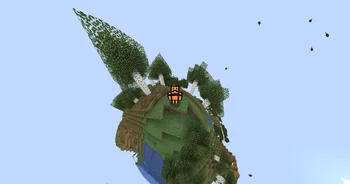
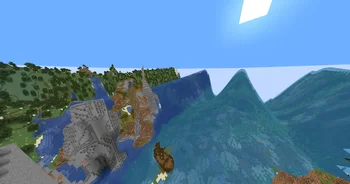

Wavy World is a shader pack made by Slok. Adds options to make the world bend.
It supports Minecraft 1.16 – 26.x. It has been downloaded 3,907 times on Modrinth. The last update came out on May 3, 2026.
The newest is 1.0, released on May 3, 2026. It is made for Minecraft 1.16.5 – 26.1.2. It runs on Iris and Optifine. The download is 6 KB.
| Version | Released | Minecraft | Type |
|---|---|---|---|
1.0 | May 3, 2026 | 1.16.5 – 26.1.2 | Release |
this is a wacky very customizeable shader that allows you to make a ton of diffrent waves it is insanely reccomended to open up the settings and play around in there
SETTINGS:
There are 3 subcategories Out X,Out Y and Out Z each one is a direction and each one decides where will the block move there are 8 Options in each one:
Enabled: Enable/Disable this subcategorie
Speed: Speed of the wave
Dead Zone: calm zone around the player
Falloff: The higher the number the lower the waves
Scale: the farther away the wave the longer it is
Bumps Or Divots: Whether to show bumps, divots, or both
Offset: Offset the cycle of the waves
Length: Only works when scale is off Makes it that everywhere has the same length wave
Y: Make waves go in Y/Y- Direction
X: Make waves go in X/X- Direction
Z: Make waves go in X/X- Direction
Written by Slok. Read it with pictures on Modrinth.
Install Iris (with Sodium) or OptiFine for your Minecraft version: shaders need one of them.
Download the .zip file from Modrinth. Do not unzip it.
In Minecraft, open Options, then Video Settings, then Shader Packs, and click Open Shader Pack Folder.
Drop the .zip file into that folder, pick Wavy World in the list and click Done.
Shaders are heavy on the graphics card. If the game gets slow, pick a lower profile in the shader settings.
| Resource | Downloads | Versions | Last update | Price |
|---|---|---|---|---|
| Wavy Worldthe one you looked at | 3,907 | 1.16 – 26.x | May 3, 2026 | Free |
| Pyvtron VXPyvton | 122K | 1.16 – 1.21 | Jan 24, 2026 | Free |
 Round WorldGhouldubs | 7,256 | 1.21 | Jan 24, 2025 | Free |
 World OutlineNemyx | 5,603 | 1.8 – 1.21 | May 16, 2026 | Free |
Yes. Wavy World supports Minecraft 26.x. All supported versions: 26.x, 1.21, 1.20, 1.19, 1.18, 1.17, 1.16.
Yes. Wavy World is free to download from Modrinth.
Yes: Iris Shaders. Install it before Wavy World.
Yes. The last update came out in the past day.
The closest ones are Pyvtron VX, Round World and World Outline. Compare all alternatives
Pyvtron VXShaders · 1.16 – 1.21Pyvtron VX is a shader that adds realism into your world!
Round WorldShaders · 1.21A simple Shader that adds a slight visual curve to the world and darkens the lighting
World OutlineShaders · 1.8 – 1.21This shader adds a simple customizable world outline, inspired by Complementary's one.
Log in to leave a review.