
 Puff RadioResource packs · 1.19 – 1.21
A Resource pack that changes the minecraft sounds to Pokemon in-game music from various Pokemon Games!
Free5,820,024 downloads

A resource pack to remove all textures from the game. Good luck beating Minecraft with no textures!
Direct download from Modrinth · 0 downloads
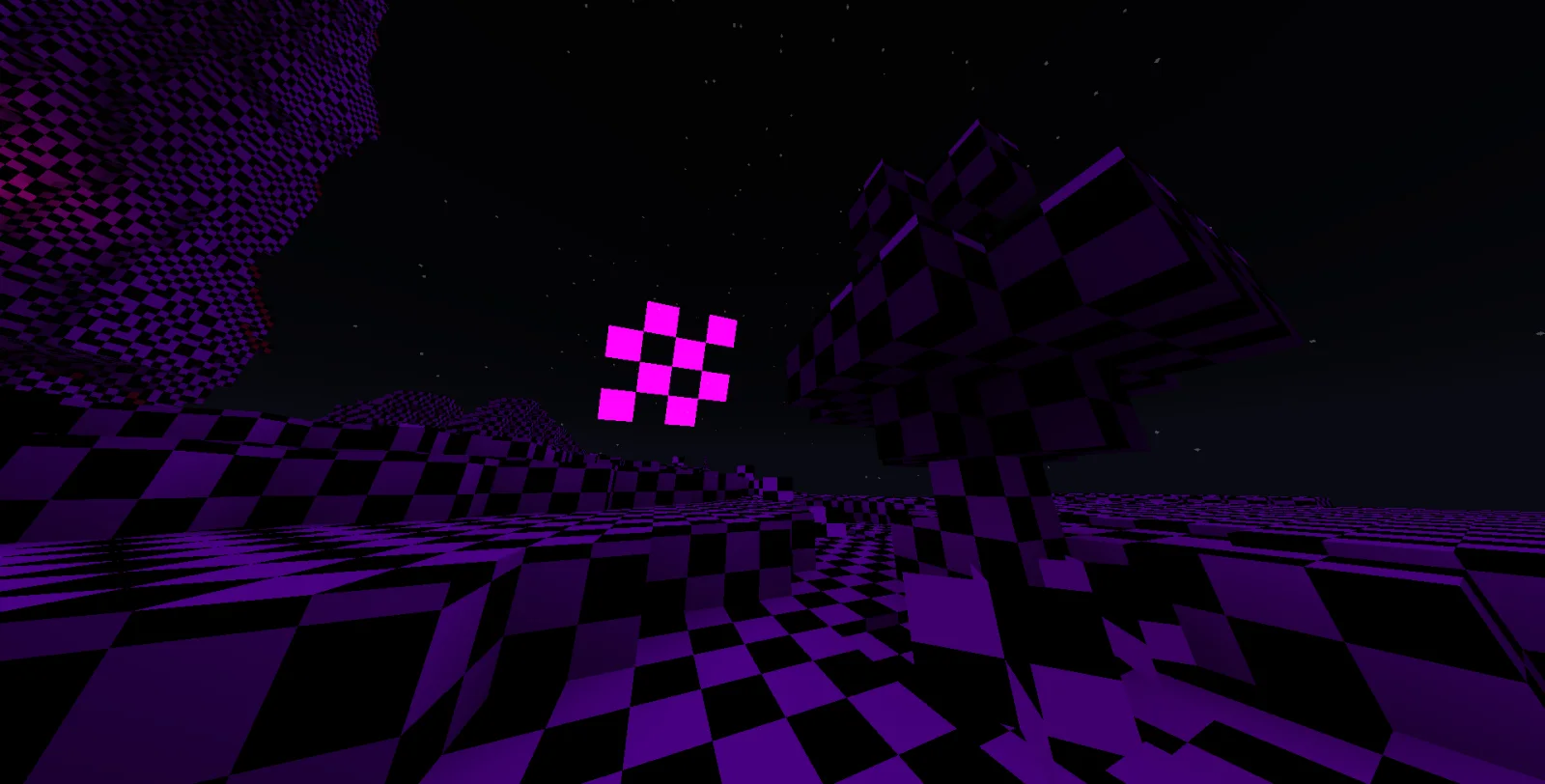
Everything Missing is a resource pack made by Neox.MC. A resource pack to remove all textures from the game. Good luck beating Minecraft with no textures!
It supports Minecraft 26.x. The last update came out on Nov 11, 2026.
The newest is 1.0, released on Nov 11, 2026. It is made for Minecraft 26.1 – 26.3. It runs on Minecraft. The download is 3.2 MB.
| Version | Released | Minecraft | Type |
|---|---|---|---|
1.0 | Nov 11, 2026 | 26.1 – 26.3 | Release |
Ever wondered what Minecraft would look like if every texture went missing?
Well, now you can find out.
This resource pack replaces almost every visual texture in Minecraft with the iconic purple-and-black missing-texture checkerboard pattern.
These are intentionally left untouched to keep the game playable and menus readable.
Your textures aren't missing. They're just all the same now.
Written by Neox.MC. Read it with pictures on Modrinth.
Download the .zip file from Modrinth. Do not unzip it.
In Minecraft, open Options, then Resource Packs, then Open Pack Folder.
Drop the .zip file into that folder and go back to the game.
Move Everything Missing to the right-hand list and click Done.
It is made for Minecraft 26.x. On other versions Minecraft marks it as incompatible, but it often still works.
Full guide: How to install Minecraft resource packs
| Resource | Downloads | Versions | Last update | Price |
|---|---|---|---|---|
| Everything Missingthe one you looked at | 0 | 26.x | 12 hours ago | Free |
| Puff RadioSwordPack69 | 5.8M | 1.19 – 1.21 | Jun 22, 2026 | Free |
 Hypixel Plusic22487 | 2.1M | 1.8 – 26.x | May 28, 2026 | Free |
 Created Simple Storage NetworkMakzzin | 1.7M | 1.18 – 1.21 | Jul 8, 2023 | Free |
Yes. Everything Missing supports Minecraft 26.x. All supported versions: 26.x.
Yes. Everything Missing is free to download from Modrinth.
Yes. The last update came out in the past day.
The closest ones are Puff Radio, Hypixel Plus and Created Simple Storage Network. Compare all alternatives
Puff RadioResource packs · 1.19 – 1.21A Resource pack that changes the minecraft sounds to Pokemon in-game music from various Pokemon Games!
Hypixel PlusResource packs · 1.8 – 26.xA Resource Pack built for the Hypixel server that textures all of SkyBlock, Bedwars, and so much more!
Created Simple Storage NetworkResource packs · 1.18 – 1.21Created Storage Network is an Resource Pack that updates the textures of this incredible mod made by Lothrazar with the textures of another incredible mod by…
 Golden Days BaseResource packs · 1.16 – 26.x
Golden Days is a Minecraft resource pack meant to bring back old textures, lighting, names, and sounds from older versions of Minecraft, like Beta. Requires…
 C418 Songs OnlyResource packs · 1.16 – 26.x
A resource pack that removes all non-c418 background tracks from the game.
 Vanilla EvolvedResource packs · 1.16 – 1.21
A vanilla minecraft resource pack with an enhanced artistic vision through the use of custom models and textures.
Log in to leave a review.