Security Radar Pro protects a Minecraft server in two places: CraftRank Guard, a plugin on your server (login, wrong-password bans, join limits, bot waves), and a protected address on our edge server that filters connection floods and hides your real address. It costs $9.99 per server for 30 days. Setup takes about 15 minutes. You need a server listed on CraftRank and a CraftRank account.
crv-) into your server's MOTD in server.properties or your MOTD plugin, and reload the server.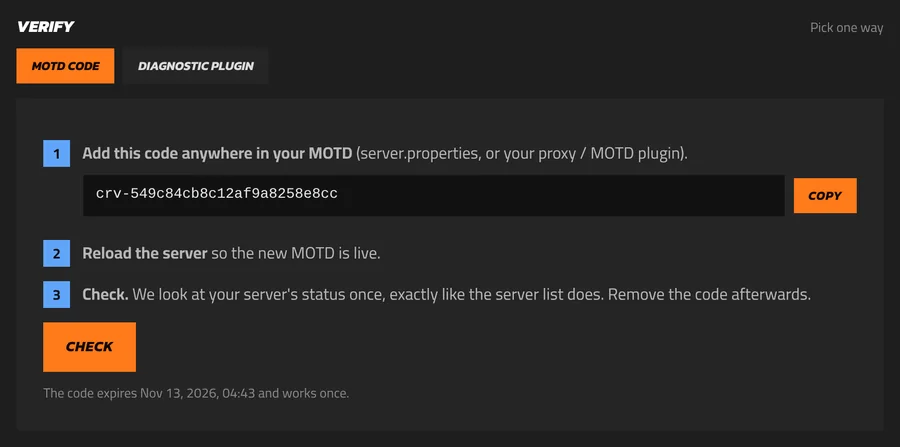
Guard runs on Paper, Spigot and their forks from 1.17, with Java 17 or newer.
CraftRankGuard.jar and put it in your server's plugins folder. Restart the server once.key-id and secret into plugins/CraftRankGuard/config.yml. The secret is shown only once; you can always rotate the key./cguard reload, then /cguard. You should see Limits: on and the end date of your plan.On an offline-mode server without another login plugin, players are now asked to /register on their first join and /login after that. If you already use AuthMe, nLogin or LibreLogin, Guard leaves logins to them and only adds the limits.
emerald. Players will join emerald.radar.craftrank.org.:port if it isn't 25565) and press Save.crp- code shown on the page to that server's MOTD and press Check the real server.With the PROXY protocol your server sees every player's real address instead of ours, so bans, Guard and your own plugins keep working. Turn it on, then restart:
config/paper-global.yml set proxies: → proxy-protocol: true.velocity.toml set haproxy-protocol = true.config.yml under the listener set proxy_protocol: true.Spigot can't read the PROXY protocol: untick Send each player's real address on the Protection page instead. Guard then leaves per-address limits to our edge.
After this, only the protected address works. A player who joins your real address directly can't get in, because their connection has no PROXY header.
emerald.radar.craftrank.org yourself to check.play.yourdomain.com → CNAME → emerald.radar.craftrank.org, enter it on the Protection page and press Check my own address.Attackers who already know your real address can still flood it directly. Allow your Minecraft port only from our edge server, 149.56.214.81, and block it for everyone else. On Linux with ufw:
sudo ufw allow from 149.56.214.81 to any port 25565 proto tcp
sudo ufw deny 25565/tcp
On shared hosting, ask your host to allow only that address, or use their firewall page. If your host gives you a new IP address, that one has never been public.
/cguard shows the plan, the login and the limits.proxy-protocol: false again: players can join your real address as before.Our edge sits on OVHcloud's network, whose anti-DDoS filters network-layer attacks first; our packet filter and proxy then stop connection floods, bot waves and ping floods, and Guard stops password guessing on your server. No setup makes a server impossible to attack, and attacks that fill a whole network line are left to OVHcloud's network protection. Read more on the Security Radar page and in how to protect a Minecraft server from griefing and DDoS.
