
 Earth ShadersShaders · 1.20 – 26.x
A bright, realistic Minecraft scene showcasing smooth lighting, soft shadows, and clear water reflections, giving the world a calm and natural atmosphere.
Free44,472 downloads

Brighter and cleaner lighting for Minecraft
Direct download from Modrinth · 3,536 downloads

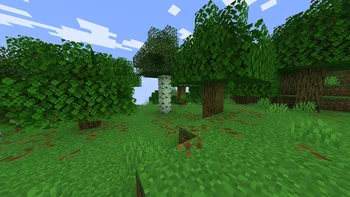
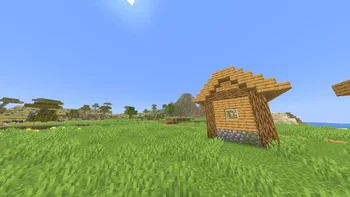
Bright Shades is a shader pack made by MinexInd. Brighter and cleaner lighting for Minecraft.
It supports Minecraft 1.21. It has been downloaded 3,536 times on Modrinth. The last update came out on Mar 20, 2026.
Bright Shades has had 5 releases on Modrinth since Nov 25, 2025. 5 of them came out in the past year. The newest is 1.2, released on Mar 20, 2026. It is made for Minecraft 1.21.11. It runs on Minecraft. The download is 395 KB.
| Version | Released | Minecraft | Type |
|---|---|---|---|
1.2 | Mar 20, 2026 | 1.21.11 | Release |
1.2 | Mar 20, 2026 | 1.21.10 | Release |
1.2 | Mar 20, 2026 | 1.21.9 | Release |
1.1 | Mar 20, 2026 | 1.21.6, 1.21.7, 1.21.8 | Release |
1.1 | Nov 25, 2025 | 1.21.2 – 1.21.5 | Release |
Bright Shades is a small core-shader resourcepack that makes Minecraft look brighter, smoother, and more colorful without changing the original style.
It’s lightweight, doesn’t need any mods, and keeps the game running fast.
Written by MinexInd. Read it with pictures on Modrinth.
Install Iris (with Sodium) or OptiFine for your Minecraft version: shaders need one of them.
Download the .zip file from Modrinth. Do not unzip it.
In Minecraft, open Options, then Video Settings, then Shader Packs, and click Open Shader Pack Folder.
Drop the .zip file into that folder, pick Bright Shades in the list and click Done.
Shaders are heavy on the graphics card. If the game gets slow, pick a lower profile in the shader settings.
Full guide: How to install Minecraft shaders
Not yet. The newest version it supports is Minecraft 1.21.
Yes. Bright Shades is free to download from Modrinth.
Yes. The last update came out in the past day.
Earth ShadersShaders · 1.20 – 26.xA bright, realistic Minecraft scene showcasing smooth lighting, soft shadows, and clear water reflections, giving the world a calm and natural atmosphere.
Log in to leave a review.