the outline lightens and darkens
Direct download from Modrinth · 3,362 downloads


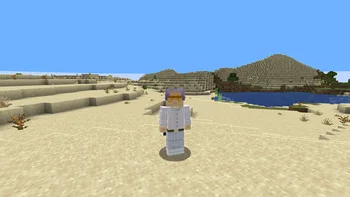
Adaptive Outline is a shader pack made by RodAnfatine. the outline lightens and darkens.
It supports Minecraft 1.20 – 1.21. It has been downloaded 3,362 times on Modrinth. The last update came out on Jul 15, 2026.
Adaptive Outline has had 2 releases on Modrinth since Dec 28, 2025. 2 of them came out in the past year. The newest is 1.1, released on Jul 15, 2026. It is made for Minecraft 1.20 – 1.21.11. It runs on Iris and Optifine. The download is 13 KB.
| Version | Released | Minecraft | Type |
|---|---|---|---|
1.1 | Jul 15, 2026 | 1.20 – 1.21.11 | Release |
1 | Dec 28, 2025 | 1.20 – 1.21.11 | Release |
The stroke brightens the light areas and darkens the dark areas.
шейдер изменём только в final.fsh
uniform sampler2D colortex0;
uniform sampler2D depthtex0;
in vec2 texcoord;
layout(location = 0) out vec4 color;
void main() {
vec2 texel = 1.0 / vec2(textureSize(colortex0, 0));
vec4 scene = texture(colortex0, texcoord);
float d_center = 1.0 - textureLod(depthtex0, texcoord, 0.0).r;
vec2 offsets[2] = vec2[](
vec2(texel.x, 0),
vec2(texel.x * 3.0, 0)
);
float gradients[4];
for(int i = 0; i < 2; i++) {
float d_right = 1.0 - textureLod(depthtex0, texcoord + offsets[i], 0.0).r;
float d_left = 1.0 - textureLod(depthtex0, texcoord - offsets[i], 0.0).r;
gradients[i] = abs(d_right - d_left) / (offsets[i].x * 2.0);
vec2 vertical_offset = vec2(0, offsets[i].x);
float d_up = 1.0 - textureLod(depthtex0, texcoord + vertical_offset, 0.0).r;
float d_down = 1.0 - textureLod(depthtex0, texcoord - vertical_offset, 0.0).r;
gradients[i + 2] = abs(d_up - d_down) / (vertical_offset.y * 2.0);
}
float gradient_ratio_h = gradients[0] / (gradients[1] + 0.0001);
float gradient_ratio_v = gradients[2] / (gradients[3] + 0.0001);
bool is_real_edge_h = gradient_ratio_h > 2.0;
bool is_real_edge_v = gradient_ratio_v > 2.0;
float edge = 0.0;
if(is_real_edge_h || is_real_edge_v) {
float max_gradient = max(gradients[0], gradients[2]);
edge = max_gradient * 500.0;
}
float depth_precision = 0.001 + d_center * 0.01;
if(edge < depth_precision * 100.0) {
edge = 0.0;
}
float threshold = 0.15;
if(edge > threshold && (is_real_edge_h || is_real_edge_v)) {
float edge_strength = clamp((edge - threshold) * 2.0, 0.0, 1.0);
vec4 color_up = texture(colortex0, texcoord + vec2(0, texel.y));
vec4 color_down = texture(colortex0, texcoord - vec2(0, texel.y));
vec4 color_left = texture(colortex0, texcoord - vec2(texel.x, 0));
vec4 color_right = texture(colortex0, texcoord + vec2(texel.x, 0));
vec4 avg_color = (color_up + color_down + color_left + color_right) * 0.25;
float neighbor_brightness = dot(avg_color.rgb, vec3(0.299, 0.587, 0.114));
float brightness_factor;
if(neighbor_brightness > 0.35) { // here we change the change threshold
brightness_factor = 1.0 + edge_strength * 0.2; // we're changing it here brightens
} else {
brightness_factor = 1.0 - edge_strength * 0.2; // we're changing it here darkens
}
color.rgb = scene.rgb * brightness_factor;
color.a = scene.a;
} else {
color = scene;
}
}
Written by RodAnfatine. Read it with pictures on Modrinth.
Install Iris (with Sodium) or OptiFine for your Minecraft version: shaders need one of them.
Download the .zip file from Modrinth. Do not unzip it.
In Minecraft, open Options, then Video Settings, then Shader Packs, and click Open Shader Pack Folder.
Drop the .zip file into that folder, pick Adaptive Outline in the list and click Done.
Shaders are heavy on the graphics card. If the game gets slow, pick a lower profile in the shader settings.
Full guide: How to install Minecraft shaders
Not yet. The newest version it supports is Minecraft 1.21.
Yes. Adaptive Outline is free to download from Modrinth.
Yes. The last update came out in the past day.
Log in to leave a review.
