
 Particle EffectsMods · 1.20 – 26.x
Visual Mod which adds unique textured particles for every effect in vanilla Minecraft!
Free7,924,728 downloads
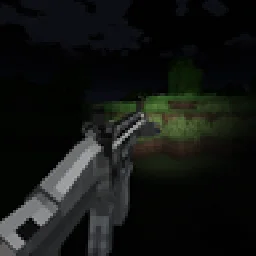
Adds TaCZ compatibility with Veil, as well as multiple visual effects using Veil
Direct download from Modrinth · 7 downloads

TaCZ: Lights is a mod made by TKG112. Adds TaCZ compatibility with Veil, as well as multiple visual effects using Veil.
It supports Minecraft 1.21. It has been downloaded 7 times on Modrinth. The last update came out on Sep 29, 2026.
The newest is 1.0.0, released on Sep 29, 2026. It is made for Minecraft 1.21.1. It runs on NeoForge. The download is 122 KB.
| Version | Released | Minecraft | Type |
|---|---|---|---|
1.0.0 | Sep 29, 2026 | 1.21.1 | Release |
TaCZ Lights brings real dynamic lighting to Timeless and Classics Zero, powered by Veil. Flashlights light up the world in front of you, lasers put a dot of light where they hit, and every shot briefly lights up the area around the gun.
Everything is driven by gunpacks: authors add a small taczlights block to their existing TaCZ display files, no extra files and no code needed.
Found in config/taczlights-client.toml. It can be edited while the game is running.
Add a taczlights block to an attachment's display file:
"taczlights": {
"default_mode": 0,
"modes": [
{
"name": "Flood",
"lights": [
{ "type": "spot", "bone": "light_pos", "color": "#FFF4E0", "brightness": 1.0, "distance": 24, "angle": 45 }
]
},
{
"name": "Focused",
"lights": [
{ "type": "spot", "bone": "light_pos", "color": "#FFF8F0", "brightness": 3.0, "distance": 60, "angle": 15 }
]
}
],
"laser_light": { "radius": 0.06, "softness": 0.6, "brightness": 2.0 }
}
TaCZ Lights must be installed on both the client and the server.
Found a bug or need help? TaCZ Lights has its own post in the TaCZ Discord server, where I answer questions and help with problems:
When reporting a problem, please include your latest.log and a list of your mods.
Written by TKG112. Read it with pictures on Modrinth.
This mod is needed on both the server and every player who joins.
Install NeoForge for Minecraft 1.21.
Download the .jar file from Modrinth and put it in the mods folder of your .minecraft directory.
Start Minecraft with the NeoForge profile.
Easier: in Prism Launcher or the Modrinth App, search for TaCZ: Lights in your instance's mods and click Install. It adds the loader and the mods it needs for you.
Full guide: How to install Minecraft mods
| Resource | Downloads | Versions | Last update | Price |
|---|---|---|---|---|
| TaCZ: Lightsthe one you looked at | 7 | 1.21 | Sep 29, 2026 | Free |
| Particle EffectsKlashRaick | 7.9M | 1.20 – 26.x | Sep 22, 2026 | Free |
 Undergarden DelightNoCube | 2.9M | 1.18 – 1.21 | Jul 9, 2026 | Free |
 Armor HudSaolGhra | 1.3M | 1.20 – 26.x | Sep 16, 2026 | Free |
Not yet. The newest version it supports is Minecraft 1.21.
Yes. TaCZ: Lights is free to download from Modrinth.
Both. The server and every player need TaCZ: Lights installed.
Yes. The last update came out in the past day.
The closest ones are Particle Effects, Undergarden Delight and Armor Hud. Compare all alternatives
Particle EffectsMods · 1.20 – 26.xVisual Mod which adds unique textured particles for every effect in vanilla Minecraft!
Undergarden DelightMods · 1.18 – 1.21Adds Farmer's Delight & The Undergarden compatibility. Vanilla style.
Armor HudMods · 1.20 – 26.xThe Armor HUD Mod adds a visual overlay to Minecraft that displays your armor's condition with color-coded durability bars. This makes it easier to keep track…
 Enchanted ArsenalMods · 1.20
A mod that adds enchantments designed to work with tacz guns
 Underground WorldsMods · 1.19 – 26.x
Adds underground biomes and underground dungeons, as well as some above ground structures, in a modular and configurable way.
 L2 HostilityMods · 1.20 – 1.21
Enemy enhancement mod that buffs enemy and adds special traits for them. Difficulty progression suits player strength well
Log in to leave a review.