
 Better Scaffolding VisibilityResource packs · 1.16 – 26.x
Better Scaffolding removes the middle texture for better visibility. A simple resource pack that makes climbing easier to see where you're going.
Free434,311 downloads

A lightweight Fullbright resource pack that improves visibility in dark areas, caves, and underground environments while keeping Minecraft's vanilla textures…
Direct download from Modrinth · 12 downloads
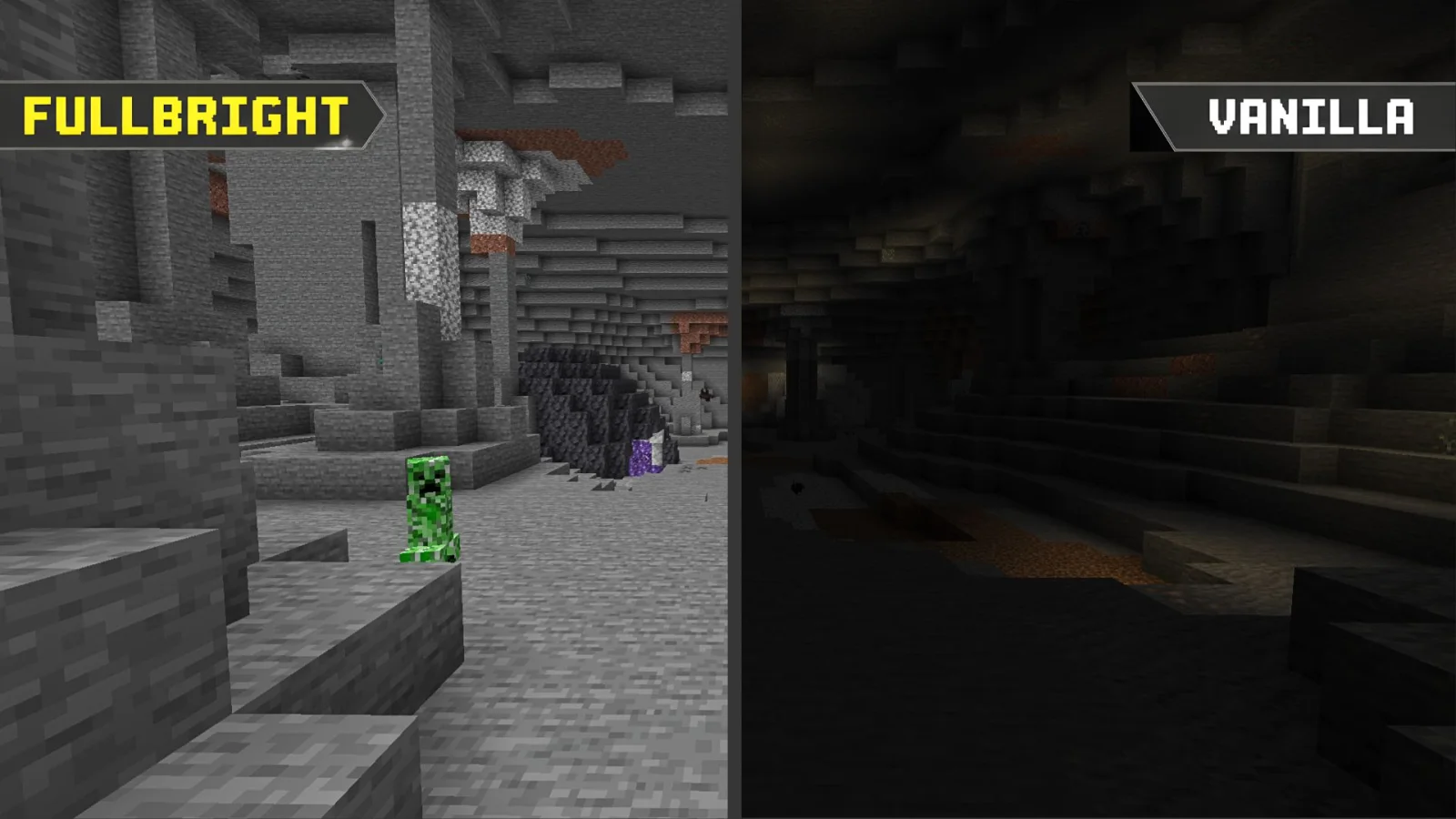
Fullbright Essentials is a resource pack made by Legend242900. A lightweight Fullbright resource pack that improves visibility in dark areas, caves, and underground environments while keeping Minecraft's vanilla textures…
It supports Minecraft 1.21 – 26.x. It has been downloaded 12 times on Modrinth. The last update came out on Nov 7, 2026.
Fullbright Essentials has had 10 releases on Modrinth since Nov 7, 2026. 10 of them came out in the past year. The newest is 26.3, released on Nov 7, 2026. It is made for Minecraft 26.3. It runs on Minecraft. The download is 11 KB.
| Version | Released | Minecraft | Type |
|---|---|---|---|
26.3 | Nov 7, 2026 | 26.3 | Release |
26.2 | Nov 7, 2026 | 26.2 | Release |
26.1.x | Nov 7, 2026 | 26.1, 26.1.1, 26.1.2 | Release |
1.21.11 | Nov 7, 2026 | 1.21.11 | Release |
1.21.9-10 | Nov 7, 2026 | 1.21.9, 1.21.10 | Release |
See clearly. Explore without limits.
Experience Minecraft with enhanced visibility using Fullbright Essentials, a lightweight, vanilla-friendly resource pack designed to make dark environments significantly easier to see.
Explore caves, mine underground, navigate dark areas, and enjoy your world without struggling with limited visibility. Whether you're playing Survival, building, exploring, or engaging in PvP, Fullbright Essentials helps you see more while preserving Minecraft's familiar visual identity.
Featured Preview
Additional Information:
Choose your preferred platform and download the version that matches your Minecraft installation!
Encountered a bug, visual glitch, or installation issue?
Discord: @legend242900
Feel free to contact me for assistance, report bugs, or share feedback. All suggestions and bug reports are appreciated!
Enjoy better visibility with Fullbright Essentials! ☀️
Written by Legend242900. Read it with pictures on Modrinth.
Download the .zip file from Modrinth. Do not unzip it.
In Minecraft, open Options, then Resource Packs, then Open Pack Folder.
Drop the .zip file into that folder and go back to the game.
Move Fullbright Essentials to the right-hand list and click Done.
It is made for Minecraft 1.21 – 26.x. On other versions Minecraft marks it as incompatible, but it often still works.
Full guide: How to install Minecraft resource packs
| Resource | Downloads | Versions | Last update | Price |
|---|---|---|---|---|
| Fullbright Essentialsthe one you looked at | 12 | 1.21 – 26.x | 9 days ago | Free |
| Better Scaffolding VisibilityAvrok | 434K | 1.16 – 26.x | Dec 31, 2025 | Free |
 BetterFullbrightnidal_mc | 8 | 1.21 | 9 days ago | Free |
 Vanilla Experience+Kryqu | 1.8M | 1.18 – 26.x | Sep 21, 2026 | Free |
Yes. Fullbright Essentials supports Minecraft 26.x. All supported versions: 26.x, 1.21.
Yes. Fullbright Essentials is free to download from Modrinth.
Yes. The last update came out in the past day.
The closest ones are Better Scaffolding Visibility, BetterFullbright and Vanilla Experience+. Compare all alternatives
Better Scaffolding VisibilityResource packs · 1.16 – 26.xBetter Scaffolding removes the middle texture for better visibility. A simple resource pack that makes climbing easier to see where you're going.
BetterFullbrightResource packs · 1.21this texture pack allow you to see very clairly on darken place
Vanilla Experience+Resource packs · 1.18 – 26.xIt improves, refines, and fixes various aspects while keeping the Vanilla style.
 Ben's BundlesResource packs · 1.20 – 26.x
3D Bundle item in hand while keeping the vanilla 2D sprite in the GUI
 FullbrightResource packs · 1.8 – 26.x
Simple fullbright resource pack compatible with 26.4 for Vanilla,Optifine,Vulkan and Sodium.
 Fresh EnvironmentResource packs · 1.20 – 26.x
Subtle visual tweaks including better rain and snow, cloud variation and more
Log in to leave a review.