
 Customizable TotemResource packs · 1.17 – 26.x
By adding your own skin to the pack, the totem of undying will update to look like ClownPierce's or Theobald's totem but with your skin!
Free136,354 downloads
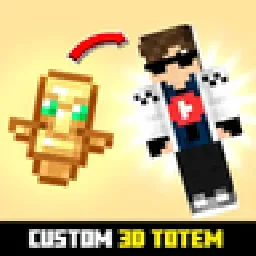
Customizable 3D Totem resource pack that lets you use your own skin as the Totem of Undying
Direct download from Modrinth · 247,694 downloads

Custom Totem 3D is a resource pack made by spunkyinsaan. Customizable 3D Totem resource pack that lets you use your own skin as the Totem of Undying.
It supports Minecraft 1.16 – 26.x. It has been downloaded 247,694 times on Modrinth. The last update came out on Mar 25, 2026.
Custom Totem 3D has had 4 releases on Modrinth since Sep 6, 2025. One of them came out in the past year. The newest is 26.1, released on Mar 25, 2026. It is made for Minecraft 26.1, 26.1.1, 26.1.2. It runs on Minecraft. The download is 55 KB.
| Version | Released | Minecraft | Type |
|---|---|---|---|
26.1 | Mar 25, 2026 | 26.1, 26.1.1, 26.1.2 | Release |
1.21 | Sep 15, 2025 | 1.21 – 1.21.11 | Release |
1.20 | Sep 15, 2025 | 1.20 – 1.20.6 | Release |
1.16 | Sep 6, 2025 | 1.16 – 1.16.5 | Release |
Replace the boring default Totem of Undying with your very own Minecraft skin!
The Spunky Custom Totem 3D Resourcepack lets you carry a miniature version of yourself every time you hold or use the Totem of Undying.
If you want to suggest anything, report a bug, or vote on future packs, then join my discord and you can message me in there. I will usually respond very quickly.
Written by spunkyinsaan. Read it with pictures on Modrinth.
Download the .zip file from Modrinth. Do not unzip it.
In Minecraft, open Options, then Resource Packs, then Open Pack Folder.
Drop the .zip file into that folder and go back to the game.
Move Custom Totem 3D to the right-hand list and click Done.
It is made for Minecraft 1.16 – 26.x. On other versions Minecraft marks it as incompatible, but it often still works.
Full guide: How to install Minecraft resource packs
| Resource | Downloads | Versions | Last update | Price |
|---|---|---|---|---|
| Custom Totem 3Dthe one you looked at | 248K | 1.16 – 26.x | Mar 25, 2026 | Free |
| Customizable TotemAlphaLeoli | 136K | 1.17 – 26.x | Oct 5, 2025 | Free |
 Custom Skin TotemTARUNEXE | 52 | 1.18 – 26.x | 17 days ago | Free |
 Vanilla EvolvedVixel | 567K | 1.16 – 1.21 | May 18, 2025 | Free |
Yes. Custom Totem 3D supports Minecraft 26.x. All supported versions: 26.x, 1.21, 1.20, 1.16.
Yes. Custom Totem 3D is free to download from Modrinth.
Yes. The last update came out in the past day.
The closest ones are Customizable Totem, Custom Skin Totem and Vanilla Evolved. Compare all alternatives
Customizable TotemResource packs · 1.17 – 26.xBy adding your own skin to the pack, the totem of undying will update to look like ClownPierce's or Theobald's totem but with your skin!
Custom Skin TotemResource packs · 1.18 – 26.xA simple custom totem featuring a unique player skin, designed to replace the default Totem of Undying with a personalized Minecraft look.
Vanilla EvolvedResource packs · 1.16 – 1.21A vanilla minecraft resource pack with an enhanced artistic vision through the use of custom models and textures.
 Aria Math X Cinematic OrchestraResource packs · 1.21 – 26.x
Give your in-game music a fresh new vibe! This resource pack swaps the default "cat" music disc with your own custom soundtrack. 🌟 Features: 🎶 Custom Audio…
 Jakotens' Pokémon Trainer CosmeticsResource packs · 1.20 – 1.21
This resource pack includes custom hats and player skins for most playable characters from the main series Pokémon games from generations 1-8, perfect for…
 Classic Minecraft YouTuber Skin PackResource packs · 1.20 – 1.21
A custom Minecraft Skin Pack created to be used with the Legacy Skins addon for Legacy4J.
Log in to leave a review.